


Running out of storage on your iPhone always seems to happen at the worst time—right when you’re about to take a photo or install an update. If you’re searching for how to buy more storage on iPhone, you’re not alone.
Here’s the reality: you can’t physically upgrade your iPhone’s internal storage after purchase, but you can expand your usable space in smart ways. This guide explains exactly what your options are, how to buy extra storage through settings, and what to do if you want more space without relying on iCloud.
Can You Actually Buy More Storage on iPhone?
Let’s clear up the biggest confusion first.
Apple iPhones don’t allow internal storage upgrades after you buy the device. That means if you have a 64GB model, you can’t turn it into 128GB physically.
However, you can expand your storage using:
- iCloud storage plans
- External storage devices
- Cloud services for photos and files
Understanding this helps set realistic expectations when learning how to buy more storage on iPhone.
How to Buy More Storage on iPhone in Settings
The most direct method is upgrading your iCloud storage.
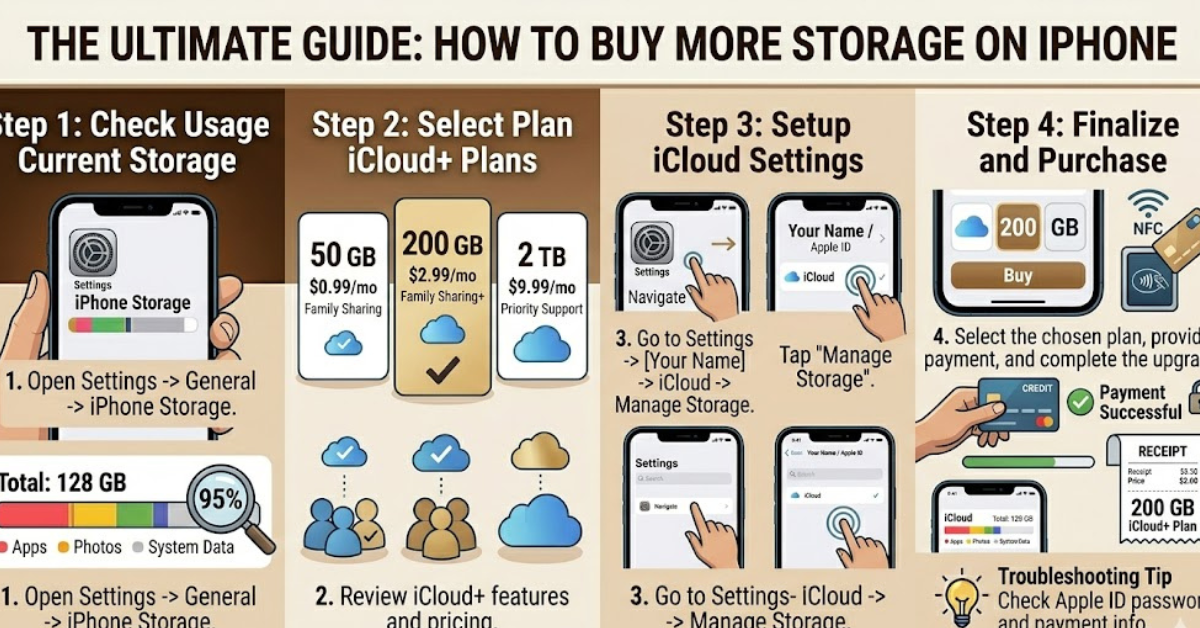
Step-by-Step Instructions
- Open Settings
- Tap your name at the top
- Select iCloud
- Tap Manage Storage or iCloud Storage
- Choose Buy More Storage or Change Storage Plan
- Select a plan and confirm payment
This is the official way Apple allows you to expand space, especially useful for backups, photos, and files.
iCloud Storage Plans Explained
When you upgrade, you’re not increasing device storage—you’re increasing cloud storage.
Common options include:
- 50GB for light users
- 200GB for families or frequent photo storage
- 2TB for heavy usage
This is ideal if your main concern is how to buy more storage on iPhone for photos or videos.
How to Buy More Storage on iPhone Not iCloud
If you prefer not to use iCloud, there are alternatives.
1. Use External Storage Devices
Lightning or USB-C flash drives can expand storage instantly. These plug directly into your iPhone and allow you to store:
- Photos and videos
- Documents
- Backups
2. Use Third-Party Cloud Apps
Apps like Google Drive or Dropbox provide additional storage without relying on Apple’s system.
3. Offload Files to a Computer
Transfer photos and videos to a laptop or external hard drive to free up space.
These methods are useful if you’re specifically looking for how to buy more storage on iPhone not iCloud.
How to Buy More Storage on iPhone for Pictures and Photos
Photos are usually the biggest storage hog.
Smart Ways to Manage Photo Storage
- Enable “Optimize iPhone Storage” in settings
- Store original files in iCloud while keeping smaller versions on your phone
- Regularly delete duplicates and screenshots
This approach works well if your main goal is how to buy more storage on iPhone for pictures without upgrading your device.
Does It Work the Same on All iPhone Models?
Yes, the process is nearly identical across models.
Whether you’re using:
- iPhone 6, 6s, or 7
- iPhone 8 or 8 Plus
- iPhone 11, 12, or newer
The steps for managing and upgrading storage remain consistent. So if you’re wondering about how to buy more storage on iPhone 11 or even older models, the method is the same through settings.
How to Pay for Storage (Including Gift Cards)
You can pay for storage using:
- Credit or debit cards
- Apple ID balance
- Gift cards
If you’re curious about how to buy more storage on iPhone with gift card, simply redeem the card to your Apple ID and use it during the upgrade process.
Tips to Free Up Space Before Buying More
Before you spend money, try these quick fixes:
- Delete unused apps
- Clear browser cache
- Remove old messages and attachments
- Offload rarely used apps
- Compress or delete large videos
Sometimes, you don’t need more storage—you just need better management.
FAQs
Can I increase iPhone storage without iCloud?
Yes, by using external drives, cloud apps, or transferring files to a computer.
Is buying iCloud storage worth it?
For most users, yes—it’s convenient and integrates seamlessly with your device.
Why is my iPhone storage full even after buying iCloud?
Because iCloud doesn’t replace device storage; it only stores data online.
Can I upgrade storage on older iPhones like iPhone 6 or 7?
Not physically, but you can still use iCloud or external storage options.
How much storage do I really need?
It depends on usage, but 200GB is a good balance for most users.
Conclusion
Understanding how to buy more storage on iPhone is really about knowing your options. While you can’t upgrade the physical storage, iCloud and external solutions make it easy to expand your usable space.
Start by checking your current storage usage, try freeing up unnecessary files, and then choose the option that fits your needs. With the right approach, running out of space can become a problem of the past.