

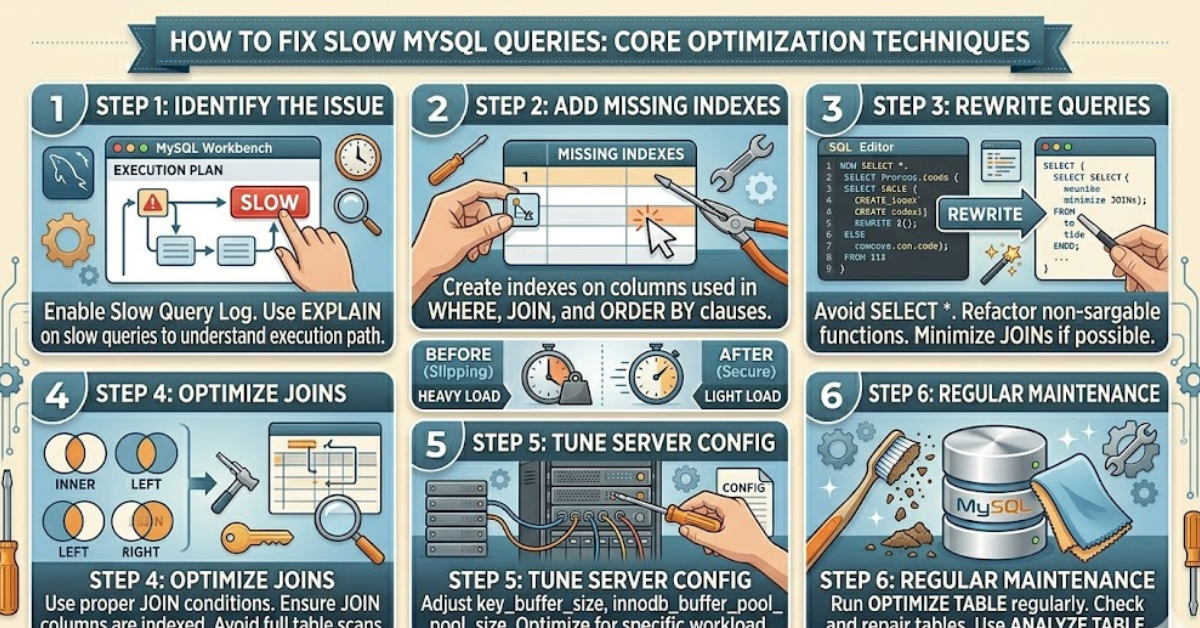

A slow database can quietly ruin your entire application. Pages take longer to load, users get frustrated, and performance drops without warning. If you’ve been searching for how to fix slow MySQL queries, you’re already on the right track.
The truth is, most slow queries aren’t caused by a single issue—they’re usually a mix of poor indexing, inefficient SQL, and server limitations. In this guide, you’ll learn practical, real-world techniques to diagnose and fix performance problems so your database runs faster and smoother.
What Causes Slow MySQL Queries?
Before jumping into solutions, it’s important to understand the root causes.
Common Reasons:
- Missing or incorrect indexes
- Large datasets without optimization
- Inefficient joins or subqueries
- Poor schema design
- Server resource limitations
Identifying the cause is the first step toward improving performance.
How to Fix Slow MySQL Queries: Start with Analysis
You can’t fix what you don’t measure.
Use EXPLAIN to Analyze Queries
The EXPLAIN statement shows how MySQL executes a query.
Look for Red Flags:
- Full table scans
- Missing indexes
- High row counts
- Temporary tables or filesorts
Why It Matters:
This insight helps you pinpoint exactly where the slowdown occurs.
Optimize Indexing for Faster Queries
Indexes are one of the most powerful tools for speeding up queries.
Best Practices:
- Add indexes to frequently searched columns
- Use composite indexes for multi-column queries
- Avoid over-indexing, which can slow writes
Example Improvements:
- Index columns used in WHERE clauses
- Index JOIN conditions
Proper indexing can reduce query time dramatically.
Rewrite Inefficient Queries
Sometimes the problem isn’t the database—it’s the query itself.
Common Fixes:
- Replace
SELECT *with specific columns - Avoid unnecessary subqueries
- Use JOINs efficiently
Example:
Instead of nested queries, use optimized joins to reduce execution time.
Limit Data Retrieval
Fetching too much data slows everything down.
Simple Techniques:
- Use
LIMITfor large datasets - Filter results with precise WHERE conditions
- Avoid returning unused columns
Why It Helps:
Less data means faster processing and lower memory usage.
Optimize Joins and Relationships
Poorly written joins can significantly impact performance.
Tips for Better Joins:
- Use indexed columns in JOIN conditions
- Avoid joining large tables unnecessarily
- Choose the correct join type (INNER, LEFT, etc.)
Efficient joins reduce the workload on your database engine.
Use Query Caching and Optimization Techniques
Caching can dramatically improve response times.
Options to Consider:
- Enable query cache (if supported)
- Use application-level caching
- Store frequently accessed results
Additional Optimization:
- Use prepared statements
- Reduce repeated queries
Improve Database Structure
A well-designed schema makes queries faster.
Key Improvements:
- Normalize data to reduce redundancy
- Use appropriate data types
- Split large tables if necessary
Bonus Tip:
Smaller, well-structured tables are easier to query efficiently.
Monitor and Tune Server Performance
Sometimes the issue isn’t the query—it’s the server.
Check These Areas:
- CPU and memory usage
- Disk I/O performance
- MySQL configuration settings
Common Tweaks:
- Increase buffer pool size
- Optimize connection limits
- Adjust query cache settings
Use Index Maintenance and Cleanup
Over time, databases accumulate inefficiencies.
Regular Maintenance Tasks:
- Remove unused indexes
- Optimize tables
- Analyze query performance logs
Keeping your database clean ensures consistent speed.
Common Mistakes to Avoid
- Ignoring slow query logs
- Adding too many indexes
- Writing complex queries without testing
- Skipping performance monitoring
Avoiding these mistakes can save hours of troubleshooting.
FAQs
What is the fastest way to fix slow queries?
Start by analyzing queries with EXPLAIN and adding proper indexes. These two steps often provide immediate improvements.
How do I identify slow queries in MySQL?
Enable the slow query log to track queries that exceed a certain execution time.
Do indexes always improve performance?
Not always. While they speed up reads, too many indexes can slow down write operations.
How often should I optimize my database?
Regular monitoring is key. Monthly checks are a good starting point for most applications.
Can hardware upgrades fix slow queries?
Yes, but they should be a last resort. Optimizing queries and structure is usually more effective and cost-efficient.
Conclusion
Learning how to fix slow MySQL queries is essential for maintaining a fast and reliable application. From analyzing execution plans to optimizing indexes and rewriting queries, small improvements can lead to significant performance gains.
Start with the basics—identify bottlenecks, clean up your queries, and fine-tune your database structure. With consistent monitoring and smart optimization, your MySQL performance will stay fast, efficient, and scalable.