

You take what should be a perfect shot—great moment, great angle—but the lighting ruins everything. If you’ve been searching for how to fix overexposed photos, you’re definitely not alone. Overexposure is one of the most common photography mistakes, especially in bright sunlight or poorly balanced camera settings.
The good news? In most cases, you can recover detail, tone down brightness, and bring your image back to life with a few smart adjustments. This guide walks you through practical techniques and tools so you can confidently fix washed-out images, whether you’re editing on a phone or a computer.
What Causes Overexposed Photos?
Before fixing the issue, it helps to understand why it happens.
Common Causes:
- Too much light entering the lens
- High ISO or slow shutter speed
- Wide aperture in bright conditions
- Incorrect exposure settings
When a photo is overexposed, highlights become blown out, meaning detail is lost in the brightest areas.
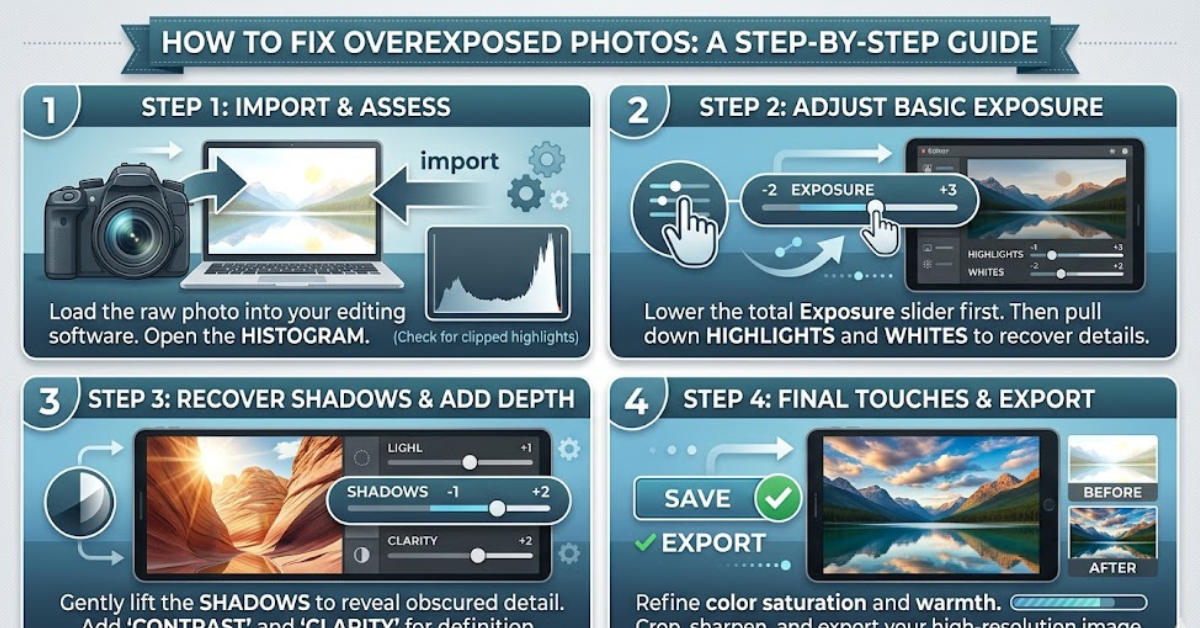
How to Fix Overexposed Photos: The Basics
No matter which editing tool you use, the process usually follows the same pattern.
Key Adjustments to Start With:
- Reduce exposure or brightness
- Lower highlights
- Adjust whites and contrast
- Recover shadows carefully
These small tweaks can make a big difference without degrading image quality.
How to Fix Overexposed Photos in Lightroom
Lightroom is one of the most powerful tools for photo correction.
Step-by-Step Guide:
- Lower the Exposure slider slightly
- Reduce Highlights to recover bright areas
- Adjust Whites to control intensity
- Increase Contrast for depth
- Fine-tune Shadows to balance the image
Pro Tip:
Use the “Highlight Clipping” warning to identify areas that have lost detail.
How to Fix Overexposed Photos in Photoshop
For more precise control, Photoshop offers advanced tools.
Effective Techniques:
- Use Camera Raw Filter for quick exposure fixes
- Apply Levels or Curves adjustments
- Use Layer Masks to target specific areas
- Try Blend Modes like Multiply for darker tones
Quick Method:
- Open your image
- Go to Image > Adjustments > Shadows/Highlights
- Adjust sliders until details return
How to Fix Overexposed Photos on iPhone
You don’t need a desktop to fix brightness issues.
Using the Photos App:
- Open the image and tap “Edit”
- Reduce Exposure and Highlights
- Adjust Brilliance and Contrast
- Save changes
Helpful Apps:
- Snapseed
- VSCO
These apps give you more control over tones and detail recovery.
How to Fix Overexposed Photos in Free Tools
If you don’t have premium software, you still have options.
Popular Free Editors:
- GIMP for desktop editing
- Pixlr for browser-based edits
- Snapseed for mobile
Basic Workflow:
- Lower brightness
- Adjust contrast
- Use selective editing tools
Even simple tools can produce impressive results when used correctly.
Advanced Editing Techniques for Better Results
If basic adjustments aren’t enough, try these methods.
1. Use Gradient Filters
Great for fixing overexposed skies without affecting the entire image.
2. Apply Local Adjustments
Target specific bright areas instead of the whole photo.
3. Recover Highlights Carefully
Too much correction can make images look dull or unnatural.
How to Prevent Overexposed Photos
Fixing is helpful, but prevention saves time.
Camera Tips:
- Use lower ISO in bright light
- Adjust shutter speed properly
- Enable HDR mode for balanced exposure
- Check histogram before shooting
Simple Rule:
Expose for highlights, not shadows. It’s easier to brighten dark areas than recover blown-out highlights.
Common Mistakes to Avoid
- Over-correcting exposure, making the image too dark
- Ignoring white balance adjustments
- Applying global edits instead of selective ones
- Editing low-quality images excessively
FAQs
Can overexposed photos be fully fixed?
It depends on the severity. Slight overexposure is usually recoverable, but completely blown-out areas may lose detail permanently.
What is the best app to fix overexposed images?
Lightroom and Snapseed are among the best for both beginners and professionals.
How do I fix overexposed photos without losing quality?
Use subtle adjustments and avoid extreme edits. Always work with high-resolution files if possible.
Is it better to shoot slightly underexposed?
Yes, slightly underexposed images retain more detail and are easier to fix later.
Can I fix overexposed photos online?
Yes, tools like Pixlr and other browser-based editors allow quick adjustments without downloads.
Conclusion
Learning how to fix overexposed photos is an essential skill for anyone who takes pictures, whether casually or professionally. With the right tools and techniques, you can recover lost detail, balance lighting, and turn a washed-out image into something worth sharing.
Start with simple exposure adjustments, explore more advanced tools as needed, and focus on prevention when shooting. Once you get the hang of it, fixing overexposed images becomes quick, easy, and surprisingly satisfying.